
On This Page
- Overview
- Setup & Configuration
- Item Level Sales Tax
- Product Tax Code
- Product Level Shipping Address
- Customer Tax Exempt Settings
- Updating Tax Code & Entity Use Codes
- Calculating Taxes in the Admin
- Scheduled Task and AvaTax
- Searching for Orders in AvaTax
- Migrating From Existing AvaTax Module
- XML Provisioning
- Sample API Request
- Sample API Response
Video Overview
Overview
AvaTax from Avalara is an industry leading sale tax solution for calculating the most accurate tax rates for your customers in real-time right during checkout. Offering tax solutions for both North America and International customers, advanced reporting, and over 700 pre-built integrations, Avatax provides best in class tools for all customers.
Setup & Configuration
Installation
- AvaTax is distributed with the core Miva software. All future updates will come automatically when you run Miva Updates from your Admin. In order to update to Miva 10.01.00 you must first be on the latest standalone version of the module which is 1.0004.
- Assign AvaTax to your store, go to Store Settings -> Store Details -> Settings -> Sales Tax Calculations and choose "AvaTax" from the drop-down menu.
Important Note: Changing your Sales Tax Module will take immediate effect. We recommend applying this change on a development store to test and verify settings before moving to a production environment.
Four new tabs appear on the Edit Store page when the module is installed:
- AvaTax Configuration
- AvaTax Charge Taxes
- AvaTax Shipping Method Taxes
- AvaTax Shipping Addresses
Note: These tabs will likely appear under the "more" menu (three dots).
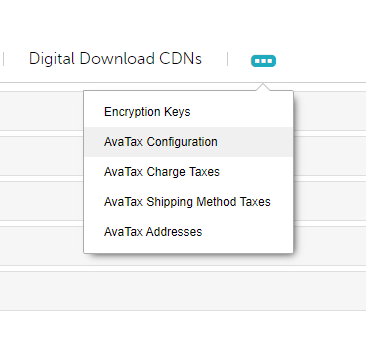
AvaTax Configuration
This is where you will add your credentials to allow you to connect to the AvaTax API.
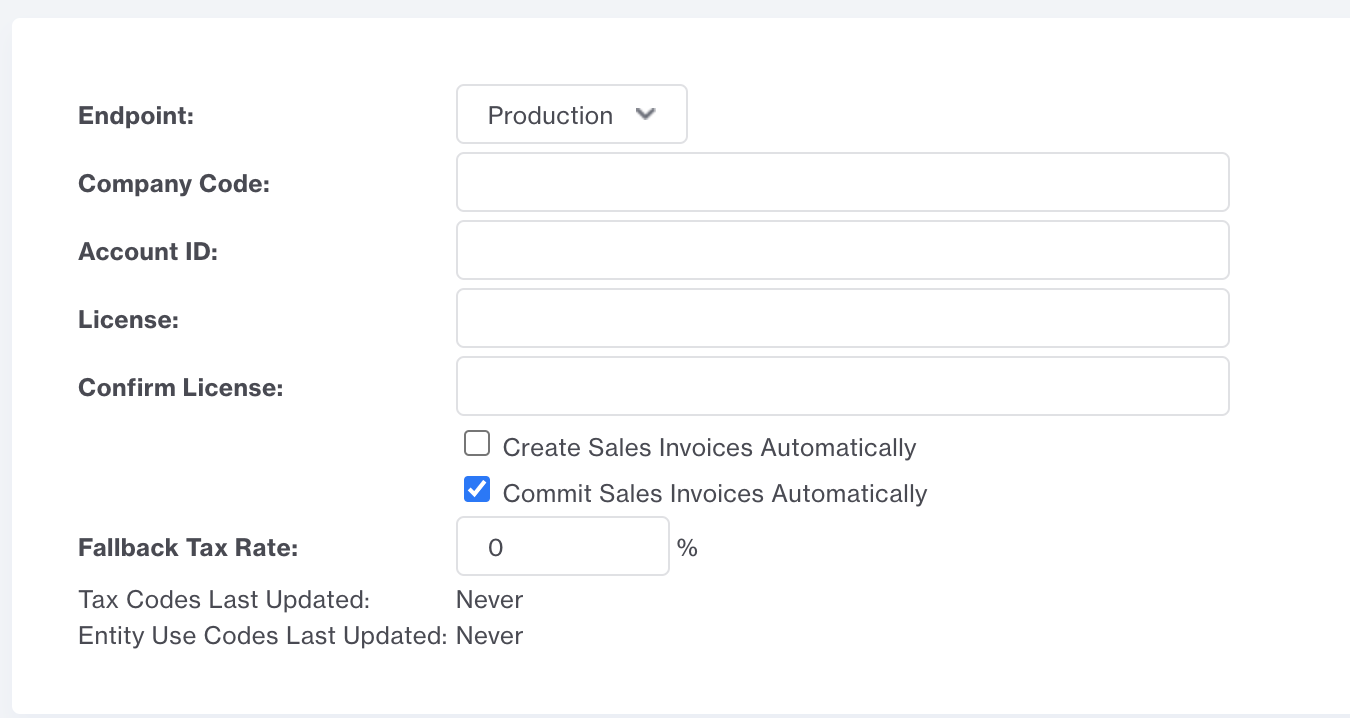
Endpoint: Choose Sandbox or Production
Company Code: This is the company code setup in the AvaTax control panel. It is located in AvaTax under: Settings -> Details -> Company Code

Account ID: Your Account ID is displayed in the AvaTax control panel when you generate an API License Key. In AvaTax go to Settings -> License & API Keys then click Generate License
License Key: Generated in the AvaTax Control Panel (see above)
Create Sales Invoices: Checkbox to automatically create sales invoices. When a customer goes through checkout, Miva will make a call to AvaTax to get tax rates. This creates a SalesOrder Transaction in AvaTax and is used to calculate real time Tax Rates. SalesOrders are temporary transactions and never used for Tax filing.
Most customers will want this setting enabled.
Commit Sales Invoices Automatically - This setting only impacts you if you have the setting above to "Automatically Create Sales Invoices" checked. AvaTax has two states for Sales Invoices: Committed or Uncommitted. See Details here whether you should send transactions as committed or uncommitted.
Fallback Tax Rate: In the rare instance that the AvaTax API is down, this fallback tax flat rate will allow orders to continue to be placed in Miva. The default is 0, which will not charge any tax but allow customers to continue to place orders. This can be modified to any flat rate percentage you want.
AvaTax Dynamic Shipping Address
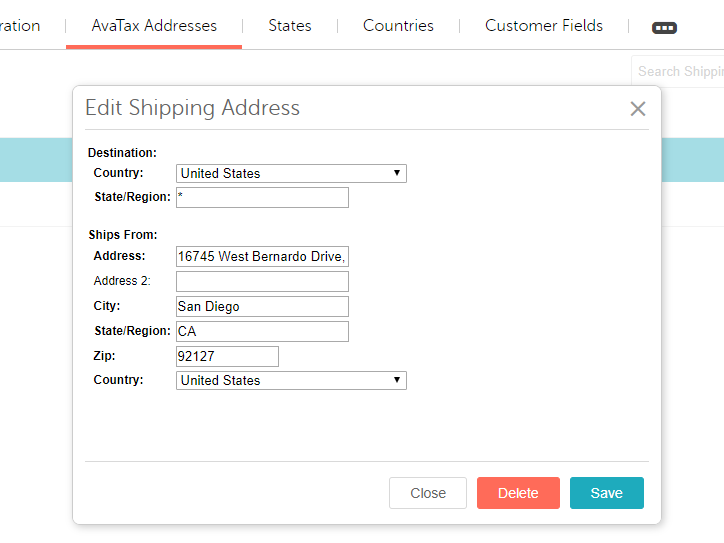
The AvaTax modules allows for multiple "from" addresses to be configured within the AvaTax Addresses tab. When calculating tax, the module will use the AvaTax From Address based on the shipping country and state from the order.
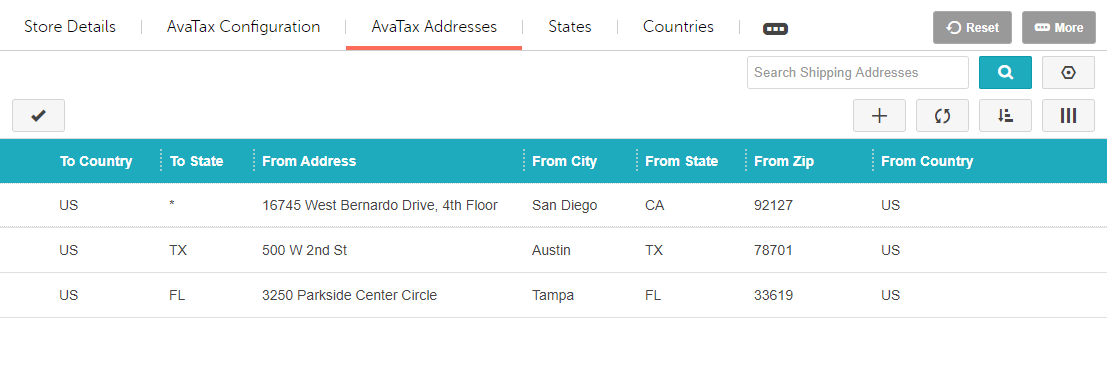
If there is not an exact match of country and state for the order found in the destination fields of the AvaTax Addresses batch list the module will use the exact country match and the * wildcard for state within the destination feilds.
In addition, the to_state/to_cntry logic works as follows
- Load an exact match of destination country and state
- If nothing found, load an exact country, "*" for state value
- If nothing is still found, the stores address will be used
AvaTax Charge Taxes
AvaTax gives you the ability to define tax codes for different types of charge types that exist in Miva, such as shipping or handling charges, and tax them independently. There are three default entries in this list:
- SHIPPING - FR
- HANDLING - OH010000
- DISCOUNT - OD010000
This covers all default Miva Charges (except TAX which is not applicable here). However, any module can create its own custom charges. If there are other charges used and they need to be taxed, you can map the charge type to its tax code.
Here you enter in the Charge Code used in Miva as well as the Tax Code from Avalara to define the tax rate on that charge.
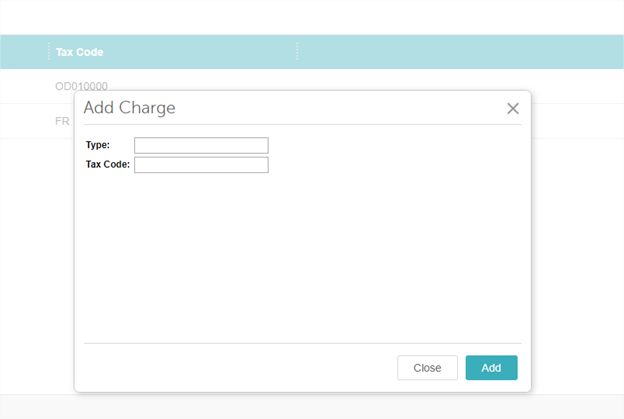
Default Values
- FR - Shipping Only common carrier - FOB destination (Backward Compatibility)
- OH010000 - Handling Charges
- OD010000 - Discounts
AvaTax Shipping Method Taxes
The AvaTax module also allows you to tax individual shipping methods. From the AvaTax Shipping Method Taxes tab you’ll see a list of all the current shipping methods you offer on your site. Here you can select a record, click edit (or double click it) and add your Tax Code.
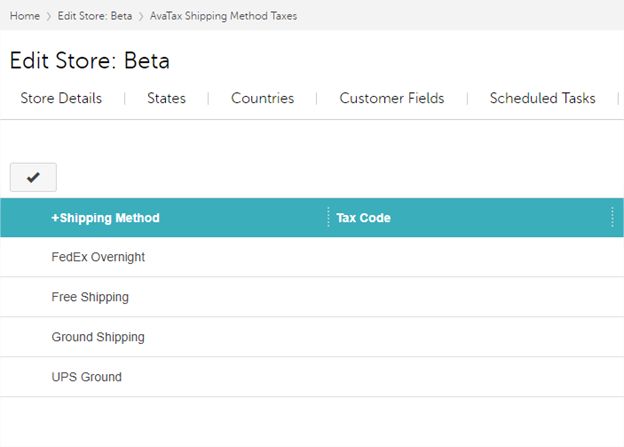
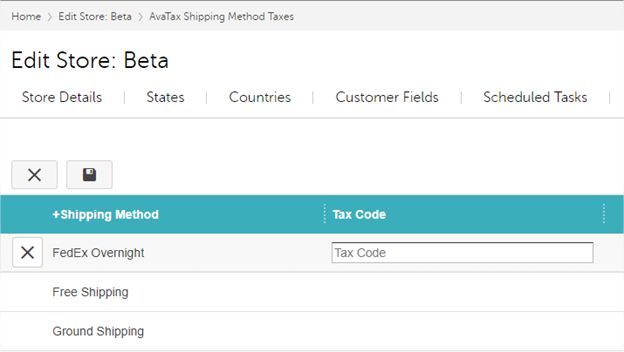
Note: The list of available tax codes can be found by editing a product and clicking lookup under the AvaTax menu.
Item Level Sales Tax
All taxes are calculated and stored at the line item level, in addition to the order level taxes. AvaTax supports item level sales tax. This is the default way (and only way) taxes are calculated and stored. In addition to item level taxes, the integration also supports taxes on shipping and other custom charges such has handling.
Product Tax Code
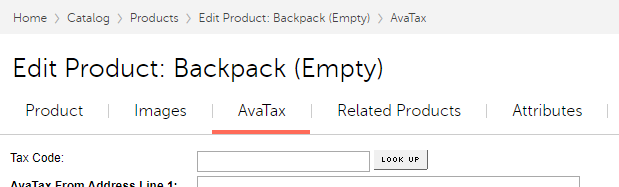
In order for AvaTax to be able to accurately calculate taxes for your customers, it needs to know the classification of each product so it can apply the correct taxes to it. This is done via Tax Codes. AvaTax has a list of almost 2400 Product Tax Codes you can choose from to classify your products.
On the Edit Product screen, click LOOK UP under the AvaTax tab group. This will bring up a modal batch list to search and look up your tax code.
Product Level Shipping Address
The AvaTax module will allow a merchant to override the shipping address on a per-product basis. When a product in the basket has the AvaTax Override From Address setting checked on the product level, the line item sent to AvaTax for that product will include the AvaTax From address within the product AvaTax settings tab.
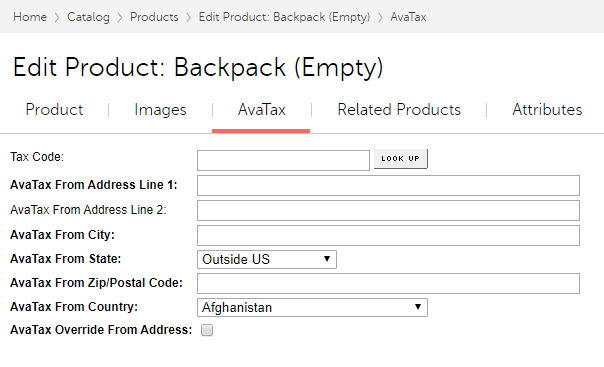
Importing AvaTax Code Assignments
It is also possible to import and export the Product Tax Code and Product Level Ship From Address assignments. These fields are available as a standard custom product fields within the product export. Go to Data Management -> Export Products to Flat File .
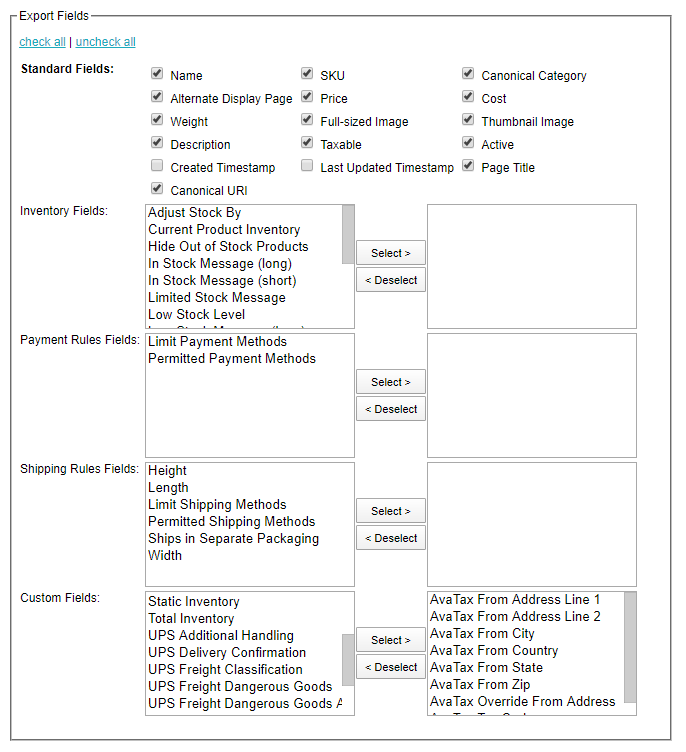
In the Custom Fields select box, choose all fields with "AvaTax" in the name and click Select > to move it to the list of fields to be exported.
Once Exported, you’ll see them in the export with the following column headers: AVATAX_FROM_ADDRESS_LINE_1
AVATAX_FROM_ADDRESS_LINE_2
AVATAX_FROM_CITY
AVATAX_FROM_COUNTRY
AVATAX_FROM_STATE
AVATAX_FROM_ZIP
AVATAX_OVERRIDE_FROM_ADDRESS
AVATAX_TAX_CODE
These headers are required when importing values from a CSV file.
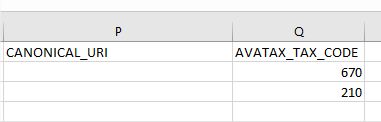
Note: The tax code is used as the import value, not the name.
Inventory Variants & Kits
The following logic is in place to determine which product tax code is sent to AvaTax when you have a product with Variants or a Kit.
Single-part variants:
- Use part product's SKU, then code as the AvaTax itemCode
- Use part product's taxcode if configured, falling back to parent's taxcode
- Use part product's name as description
Multi-part variants (kits):
- Use master product's SKU, then code as the AvaTax itemCode
- Use the master product's taxcode
Note: For Kits, the master product SKU/Code and Tax Code are always sent, part product tax codes are ignored.
Customer Tax Exempt Settings
AvaTax supports customer tax exemptions which allows you to mark specific customers as Tax Exempt and they will not be charged tax when they purchase from Miva.
Before you can identify a customer as Tax Exempt in Miva, you first need to create them as a customer in AvaTax. Go to Exemptions -> Add an Exempt Customer.
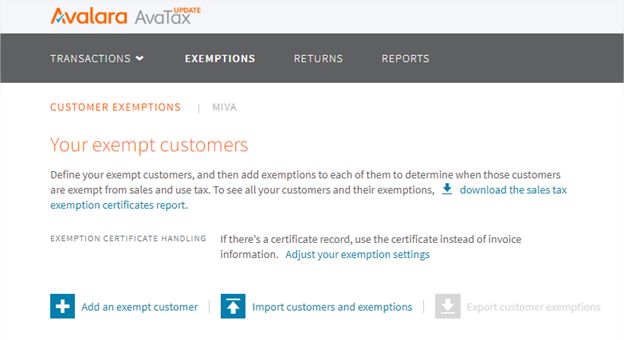
When you add a customer, AvaTax generates a customer code. You can use this auto-generated code or use your own.
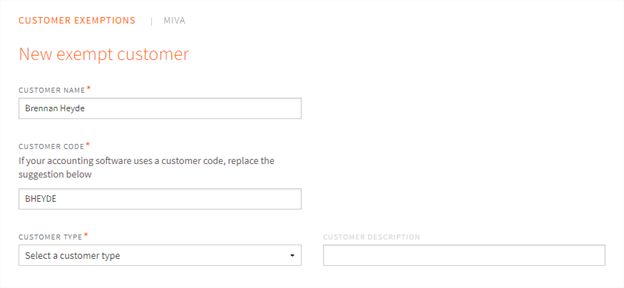
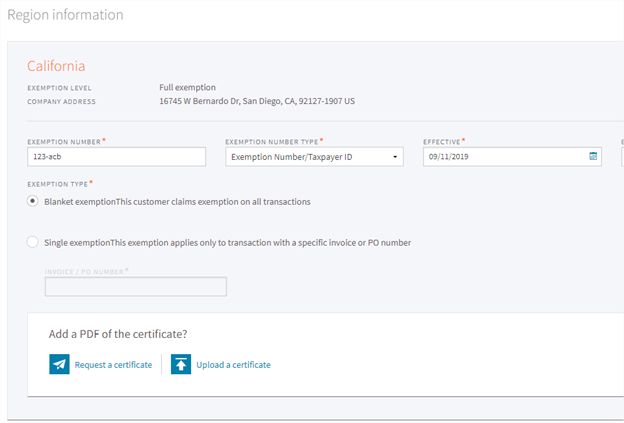
From here you can choose which regions the customer is exempt from and add an exemption number. The exemption number is a unique number found on a customer's exemption document.
The Customer Code, Entity Use Code, and Exemption Number must be all linked to the customer in Miva. Go to Customers -> Edit Customer -> AvaTax tab. Here you can enter the same information for the customer created in AvaTax.
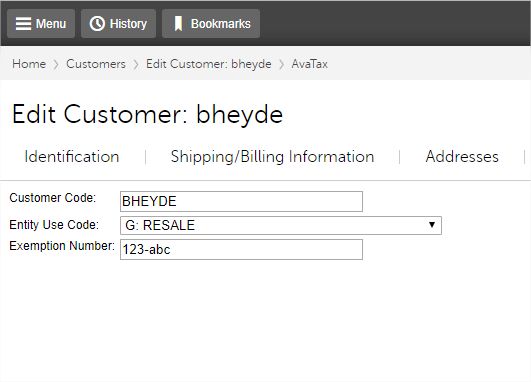
Important : If a customer is designated as Tax Exempt in Miva, but not established as a tax exempt customer in AvaTax, Avalara will ignore the Tax Exempt flag in Miva and will tax the customer as usual. Any customer tax exemptions must be set up in AvaTax.
These values can be accessed via template code using the following function:
<mvt:do file="g.module_store_module_tax" name="l.success" value="AvaTaxCustomer_Load_Customer( l.settings:customer:id, l.settings:avataxcustomer ) " />Response:&mvte:avataxcustomer:cust_id;&mvte:avataxcustomer:code;&mvte:avataxcustomer:usecode;&mvte:avataxcustomer:exemption;
AvaTax has the following Entity Use Codes:
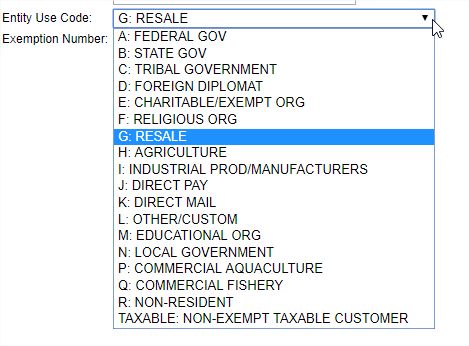
Updating Tax Code & Entity Use Codes
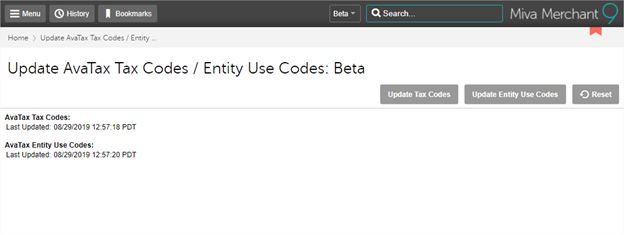
Both the Product Tax Codes and Entity Use Codes get updated by AvaTax. To sync your list with the latest list from AvaTax, the module provides a way to make a request to AvaTax to get the latest list.
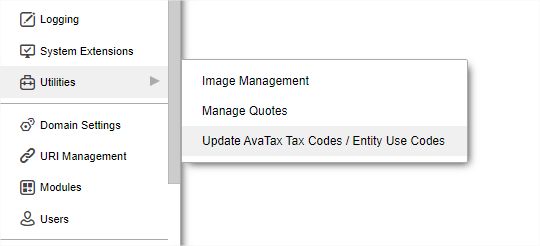
Go to Utilities -> Click the Arrow (submenu) -> Update AvaTax Tax Codes / Entity Use Codes .
From here you can update either list
Real Time Tax Calculations
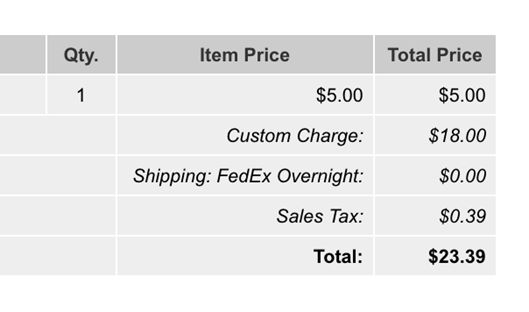
The main benefit of the AvaTax module is the ability to calculate and display accurate real-time rates to the customer during checkout. The contents of the customer's basket along with any product tax codes and customer exemptions are sent to AvaTax as the customer is going through checkout. AvaTax will determine the tax rate and return it to Miva. Miva displays it to the customer as its own line item on the order giving the accurate tax costs before the customer completes their order.
Setup In AvaTax
Note: AvaTax should walk you through this configuration with their new customer onboarding. This guide does not cover all possible setup examples and should just be used as a high level guide.
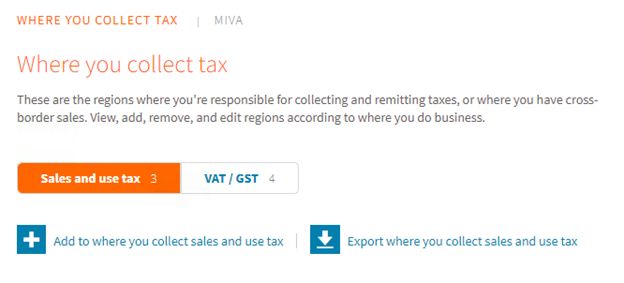
In AvaTax click on Settings -> Where you collect tax .
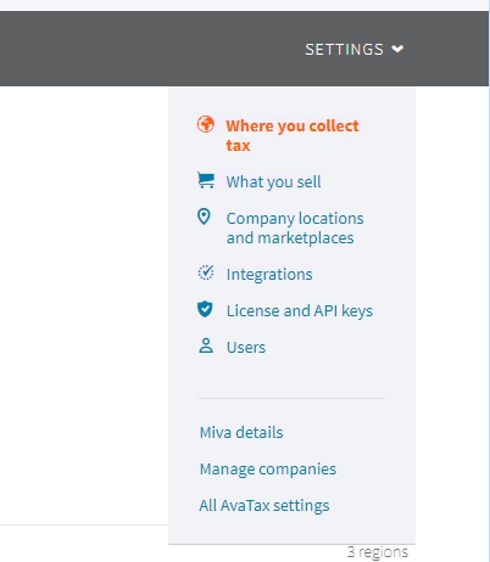
From here click on “ Add to where you collect sales and use tax ”
Calculating Taxes in the Admin
AvaTax supports tax calculations when manually creating orders in the Miva admin, such as phone orders.
Discounts are handled in a way that ensures accurate tax calculation.
For item-level discounts, the final discounted price is sent to AvaTax.
Basket-level discounts are grouped and sent as a single amount.
Scheduled Task and AvaTax
In addition to calculating taxes manually during order creation, Miva can automatically handle AvaTax tasks like inserting, adjusting, voiding, and refunding invoices using Scheduled Tasks. Additionally, sales tax is automatically recalculated when orders are edited in the admin, no manual steps needed. Learn how create Scheduled Tasks ›
For example: A Scheduled task like, "Process AvaTax Order Queue" has the following default settings:
- Trigger: avatax_orders
- Trigger Delay: 300 second(s)
- Schedule: Manual or Triggered
When run, the Process AvaTax Order Queue scheduled task processes all pending AvaTax actions by reviewing records in the system that are marked as queued. For each queued order, the task performs the appropriate AvaTax action, such as inserting, adjusting, voiding, or refunding the invoice.
To add the Process AvaTax Order Queue Scheduled Task go to PATH: Setting > Store Settings > Locate the Scheduled Tasks tab > Click on the Create New Scheduled Task button > locate the AvaTax Task in the Operation Drop-down.
Automatic Tax Calculation
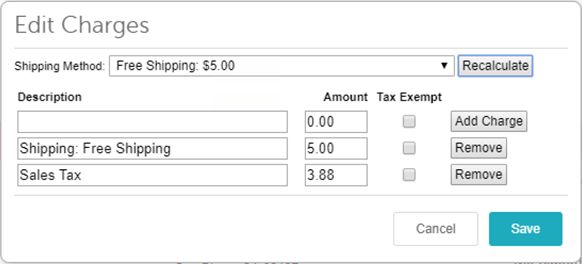
It's also possible to calculate (or recalculate) taxes for any order in the Miva admin. Sales taxes in admin are calculated in two scenarios:
- Automatically any time an item is added, removed or updated on an order.
- Manually by clicking the Edit Shipping/Taxes/Other Charges button and clicking the Recalculate button. This will update shipping but also recalculate all tax changes based on the current order.
Manual Order Actions
When viewing and updating an order within the Miva admin, there are three actions you can take to modify the order in AvaTax.
Insert Order Into AvaTax
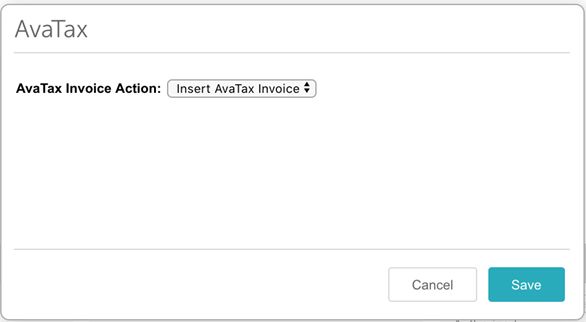
All orders placed manually via the Miva admin will need the order manually pushed to AvaTax. This allows the transaction to be recorded in AvaTax. To insert the order into AvaTax, click the AvaTax link on the order detail screen. This causes a SalesInvoice to be created for the order just as if the customer had placed the order via the checkout process:
Adjust AvaTax Invoice
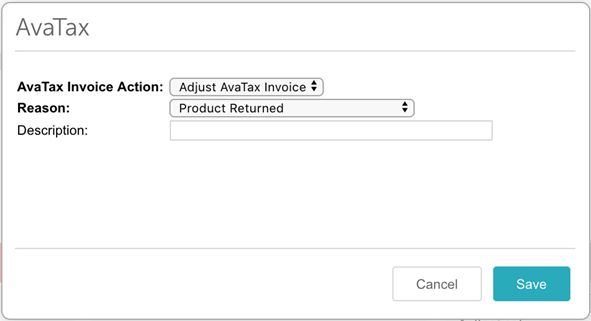
If an order changes and you need to adjust the tax amount in AvaTax, you select “Adjust AvaTax Invoice”. This then allows you to choose a reason from a predefined list and add a description.
Void AvaTax Invoice
Miva also allows you to void the AvaTax invoice. To do this, select “Void AvaTax Invoice”. A Refund in this context is only used for Tax Reporting in AvaTax and does not issue any money back to the customer.
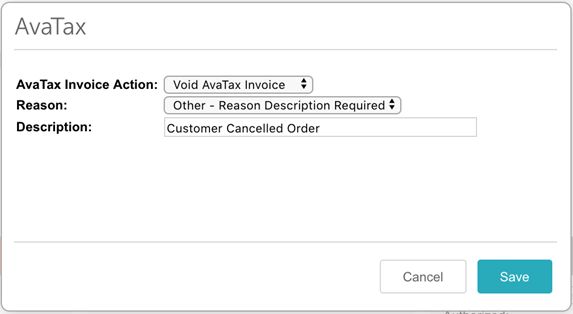
You will be prompted for a reason and a description. If you choose “Other” as the reason, the description will be required. Otherwise it is optional.
Refund AvaTax Invoice
If an order is returned or cancelled, Miva also allows you to refund the AvaTax invoice. To do this, select “Refund AvaTax Invoice”.
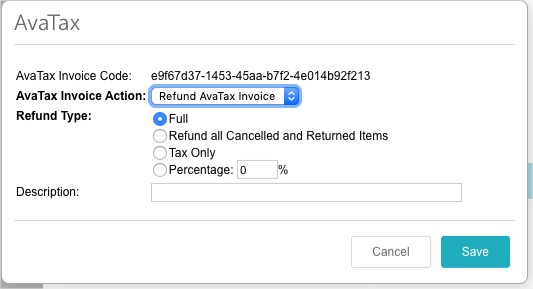
There are 4 options when you refund an invoice:
- Full - Refunds the full amount of the tax in AvaTax
- Refund all Cancelled and Returned Items - This option only shows if the order has cancelled or returned items
- Tax Only - Refunds just the Tax Amount
- Percentage - Allows you to specify what % of the Tax to refund
Note: Issuing a refund in AvaTax does not do anything with payments. That needs to be done separately if you wish to refund money back to the customer.
Historical Order Import
AvaTax offers the ability to import historical orders via CSV format. In AvaTAx Under Transactions, go to " Import transactions ".
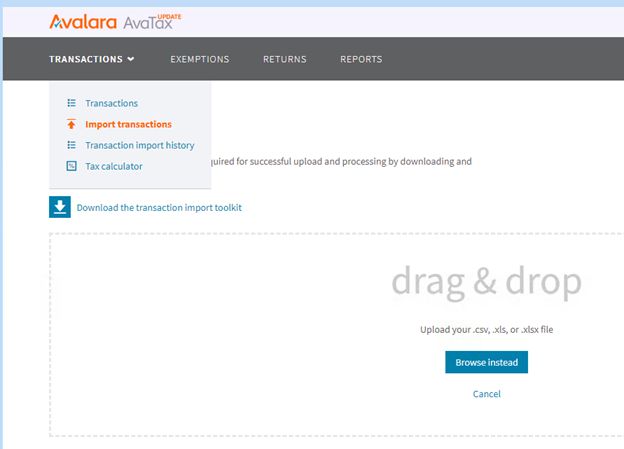
From this page you can download their transaction import toolkit which has example CSV files for the import format.
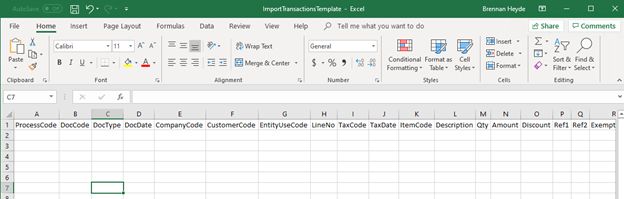
Miva recommends that you create a custom batch report to output transactions into CSV format.
Searching for Orders in AvaTax
When an invoice is created in AvaTax, a unique transaction code is saved with the order in Miva. You can view it in the Orders batch list or by opening the order and selecting the AvaTax tab.
When Miva successfully retrieves the AvaTax transaction, it displays:
- Miva Merchant Status — The AvaTax processing status stored in Miva.
- Transaction Status — The current status returned by AvaTax.
- Transaction Code — The unique code used to locate the transaction in AvaTax.
The Miva order number is also sent to AvaTax and appears in the Reference Code field.
How to Find Orders That Did Not Sync to AvaTax
Step 1: Show AvaTax Columns
In the Orders screen:
Click the column selector (+ icon)
-
Enable the following fields:
AvaTax Invoice Code
AvaTax Queued For Update
AvaTax Status
Once enabled, you can view AvaTax details right in the order list.
Step 2: Identify Orders That Need Attention
Use AvaTax fields to understand the order’s current state:
AvaTax Queued For Update = Yes/ No indicates whether the order is queued for processing.
AvaTax Status = Queued means the order is waiting to be processed by the Process AvaTax Order Queue scheduled task.
AvaTax Invoice Code is populated means an AvaTax transaction has been created for the order.
If an order has a blank AvaTax Invoice Code and is not queued, it likely needs attention.
Step 3: Create an Advanced Search
To quickly find and review orders that may not have synced to AvaTax:
1. Click Search > Advanced Search
2. Find and set one or more the following filters:
AvaTax Invoice Code → Select Empty Field
AvaTax Queued For Update → Set to No
AvaTax Status → Set filter to Not Equal To, then enter Queued
4. Click Search
5. Click Save Current Search and name it something like “AvaTax Orders Not Synced.” This creates a saved view you can return to anytime.
Migrating From Existing AvaTax Module
If your site is currently using the old AvaTax integration it is recommended you plan on migrating to this version when convenient. Here are the high level steps:
- Setup the new module in a dev environment
- Import all your product tax codes and customer exemptions to the dev environment
- Test and verify things are working as expected in dev
- Pick a time to make the change over when you remove the old module from the live store , add the new module and import the settings from the dev store.
- Once the new integration is live, the old module should be uninstalled and the php scripts on the server should be removed. (The new integration does not use them.)
XML Provisioning
The following XML Provisioning tags are supported:
 Provisioning tags are supported:

<Module code="avatax" feature="tax">
    <ShippingAddress_Add>
        <ToCountry>GB</ToCountry>
        <ToState>Westminster</ToState>

        <FromAddress1>123 Main st</FromAddress1>
        <FromAddress2>Appt 400</FromAddress2>
        <FromCity>Bay City</FromCity>
        <FromState>CO</FromState>
        <FromZip>92106</FromZip>
        <FromCountry>US</FromCountry>
    </ShippingAddress_Add>

    <ShippingAddress_Update to_country="UZ" to_state="Bobville">
        <ToCountry>US</ToCountry>
        <ToState>*</ToState>

        <FromAddress1>16745 W Bernardo Dr </FromAddress1>
        <FromAddress2>#400</FromAddress2>
        <FromCity>San Diego</FromCity>
        <FromState>CA</FromState>
        <FromZip>92127</FromZip>
        <FromCountry>US</FromCountry>
    </ShippingAddress_Update>

    <ShippingAddress_Delete to_country="US" to_state="Delete Me" />
</Module>
//Possible Entity Use Codes. You only pass the value in the XML, not the full name

<option value="A">A: Federal government</option>
<option value="B">B: State government</option>
<option value="C">C: Tribal government</option>
<option value="D">D: Foreign diplomat</option>
<option value="E">E: Charitable organization</option>
<option value="F">F: Religious organization</option>
<option value="G">G: Resale</option>
<option value="H">H: Agricultural production</option>
<option value="I">I: Industrial production or manufacturers</option>
<option value="J">J: Direct pay permit</option>
<option value="K">K: Direct mail</option>
<option value="L">L: Other or custom</option>
<option value="M">M: Educational organization</option>
<option value="N">N: Local government</option>
<option value="P">P: Commercial aquaculture</option>
<option value="Q">Q: Commercial fishery</option>
<option value="R">R: Non-resident</option>
<option value="TAXABLE">TAXABLE: Fully Taxable</option>
<Customer_CustomField module="avatax" customer="bheyde" field="code">12345</Customer_CustomField>
<Customer_CustomField module="avatax" customer="bheyde" field="usecode">C</Customer_CustomField>
<Customer_CustomField module="avatax" customer="bheyde" field="exemption">55555</Customer_CustomField>
//add product tax code to a product
<Product_CustomField module="avatax" product="test" field="taxcode">12345</Product_CustomField>
<Module code="avatax" feature="tax">
    <Settings>
        <Endpoint>Sandbox|Production</Endpoint>
        <Username>...</Username>
        <Password>...</Password>
        <CompanyCode>...</CompanyCode>
        <CreateSalesInvoices>Yes|No</CreateSalesInvoices>
    </Settings>

    <ChargeTaxCode_Add type="SHIPPING" taxcode="def" />
    <ChargeTaxCode_Update type="SHIPPING" taxcode="def" />
    <ChargeTaxCode_Delete type="SHIPPING" />

    <ShippingMethodTaxCode_Update module_code="upsxml" method_code="01" taxcode="FR000001" />

    <TaxCodes_Update />
    <EntityUseCodes_Update />
</Module>
Sample API Request
{
   "lines":[
      {
         "number":"77",
         "quantity":"1",
         "amount":"5",
         "itemCode":"test",
         "taxCode":"0670",
         "description":"Test Prod"
      },
      {
         "number":"1027_169",
         "quantity":"1",
         "amount":"0",
         "itemCode":"test",
         "taxCode":"0670",
         "description":"SHIPPING: Shipping: FedEx Overnight"
      }
   ],
   "type":"SalesOrder",
   "date":"09\/16\/2019",
   "companyCode":"MIVA",
   "customerCode":"none",
   "purchaseOrderNo":"",
   "addresses":{
      "shipFrom":{
         "line1":"16745 W Bernardo Dr Ste 400",
         "city":"San Diego",
         "region":"CA",
         "country":"US",
         "postalCode":"92127-1908"
      },
      "shipTo":{
         "line1":"16745 Bernardo Dr Fourth Floor",
         "line2":"Fourth Floor",
         "city":"San Diego",
         "region":"CA",
         "country":"US",
         "postalCode":"92127"
      }
   },
   "referenceCode":"",
   "description":"Miva Merchant Order 1027"
}
Sample API Response
{
   "id":0,
   "code":"4feac16a-2f6c-455f-853b-b6068e5d0d7b",
   "companyId":838824,
   "date":"2019-09-16",
   "paymentDate":"2019-09-16",
   "status":"Temporary",
   "type":"SalesOrder",
   "customerUsageType":"G",
   "entityUseCode":"G",
   "customerVendorCode":"none",
   "customerCode":"none",
   "reconciled":false,
   "purchaseOrderNo":"",
   "referenceCode":"",
   "totalAmount":1000.0,
   "totalExempt":1000.0,
   "totalDiscount":0.0,
   "totalTax":0.0,
   "totalTaxable":0.0,
   "totalTaxCalculated":0.0,
   "adjustmentReason":"NotAdjusted",
   "locked":false,
   "version":1,
   "exchangeRateEffectiveDate":"2019-09-16",
   "exchangeRate":1.0,
   "description":"Miva Merchant Order 1026",
   "modifiedDate":"2019-09-16T17:07:29.9832454Z",
   "modifiedUserId":400887,
   "taxDate":"2019-09-16T00:00:00",
   "lines":[
      {
         "id":0,
         "transactionId":0,
         "lineNumber":"76",
         "description":"Sample",
         "discountAmount":0.0,
         "exemptAmount":1000.0,
         "exemptCertId":0,
         "isItemTaxable":false,
         "itemCode":"sample",
         "lineAmount":1000.0,
         "quantity":1.0,
         "reportingDate":"2019-09-16",
         "tax":0.0,
         "taxableAmount":0.0,
         "taxCalculated":0.0,
         "taxCode":"0210",
         "taxCodeId":38054,
         "taxDate":"2019-09-16",
         "taxIncluded":false,
         "details":[
            {
               "id":0,
               "transactionLineId":0,
               "transactionId":0,
               "country":"US",
               "region":"CA",
               "exemptAmount":1000.0,
               "jurisCode":"06",
               "jurisName":"CALIFORNIA",
               "stateAssignedNo":"",
               "jurisType":"STA",
               "jurisdictionType":"State",
               "nonTaxableAmount":0.0,
               "rate":0.060000,
               "tax":0.0,
               "taxableAmount":0.0,
               "taxType":"Sales",
               "taxSubTypeId":"S",
               "taxName":"CA STATE TAX",
               "taxAuthorityTypeId":45,
               "taxCalculated":0.0,
               "rateType":"General",
               "rateTypeCode":"G",
               "unitOfBasis":"PerCurrencyUnit",
               "isNonPassThru":false
            },
            {
               "id":0,
               "transactionLineId":0,
               "transactionId":0,
               "country":"US",
               "region":"CA",
               "exemptAmount":1000.0,
               "jurisCode":"073",
               "jurisName":"SAN DIEGO",
               "stateAssignedNo":"",
               "jurisType":"CTY",
               "jurisdictionType":"County",
               "nonTaxableAmount":0.0,
               "rate":0.002500,
               "tax":0.0,
               "taxableAmount":0.0,
               "taxType":"Sales",
               "taxSubTypeId":"S",
               "taxName":"CA COUNTY TAX",
               "taxAuthorityTypeId":45,
               "taxCalculated":0.0,
               "rateType":"General",
               "rateTypeCode":"G",
               "unitOfBasis":"PerCurrencyUnit",
               "isNonPassThru":false
            },
            {
               "id":0,
               "transactionLineId":0,
               "transactionId":0,
               "country":"US",
               "region":"CA",
               "exemptAmount":1000.0,
               "jurisCode":"EMBD0",
               "jurisName":"SAN DIEGO COUNTY DISTRICT TAX SP",
               "stateAssignedNo":"013",
               "jurisType":"STJ",
               "jurisdictionType":"Special",
               "nonTaxableAmount":0.0,
               "rate":0.005000,
               "tax":0.0,
               "taxableAmount":0.0,
               "taxType":"Sales",
               "taxSubTypeId":"S",
               "taxName":"CA SPECIAL TAX",
               "taxAuthorityTypeId":45,
               "taxCalculated":0.0,
               "rateType":"General",
               "rateTypeCode":"G",
               "unitOfBasis":"PerCurrencyUnit",
               "isNonPassThru":false
            },
            {
               "id":0,
               "transactionLineId":0,
               "transactionId":0,
               "country":"US",
               "region":"CA",
               "exemptAmount":1000.0,
               "jurisCode":"EMTU0",
               "jurisName":"SAN DIEGO CO LOCAL TAX SL",
               "stateAssignedNo":"37",
               "jurisType":"STJ",
               "jurisdictionType":"Special",
               "nonTaxableAmount":0.0,
               "rate":0.010000,
               "tax":0.0,
               "taxableAmount":0.0,
               "taxType":"Sales",
               "taxSubTypeId":"S",
               "taxName":"CA SPECIAL TAX",
               "taxAuthorityTypeId":45,
               "taxCalculated":0.0,
               "rateType":"General",
               "rateTypeCode":"G",
               "unitOfBasis":"PerCurrencyUnit",
               "isNonPassThru":false
            }
         ],
         "nonPassthroughDetails":[

         ],
         "hsCode":"",
         "costInsuranceFreight":0.0,
         "vatCode":"",
         "vatNumberTypeId":0
      },
      {
         "id":0,
         "transactionId":0,
         "lineNumber":"1026_166",
         "description":"SHIPPING: Shipping: Free Shipping",
         "discountAmount":0.0,
         "exemptAmount":0.0,
         "exemptCertId":0,
         "isItemTaxable":false,
         "itemCode":"sample",
         "lineAmount":0.0,
         "quantity":1.0,
         "reportingDate":"2019-09-16",
         "tax":0.0,
         "taxableAmount":0.0,
         "taxCalculated":0.0,
         "taxCode":"0210",
         "taxCodeId":38054,
         "taxDate":"2019-09-16",
         "taxIncluded":false,
         "details":[
            {
               "id":0,
               "transactionLineId":0,
               "transactionId":0,
               "country":"US",
               "region":"CA",
               "exemptAmount":0.0,
               "jurisCode":"06",
               "jurisName":"CALIFORNIA",
               "stateAssignedNo":"",
               "jurisType":"STA",
               "jurisdictionType":"State",
               "nonTaxableAmount":0.0,
               "rate":0.060000,
               "tax":0.0,
               "taxableAmount":0.0,
               "taxType":"Sales",
               "taxSubTypeId":"S",
               "taxName":"CA STATE TAX",
               "taxAuthorityTypeId":45,
               "taxCalculated":0.0,
               "rateType":"General",
               "rateTypeCode":"G",
               "unitOfBasis":"PerCurrencyUnit",
               "isNonPassThru":false
            },
            {
               "id":0,
               "transactionLineId":0,
               "transactionId":0,
               "country":"US",
               "region":"CA",
               "exemptAmount":0.0,
               "jurisCode":"073",
               "jurisName":"SAN DIEGO",
               "stateAssignedNo":"",
               "jurisType":"CTY",
               "jurisdictionType":"County",
               "nonTaxableAmount":0.0,
               "rate":0.002500,
               "tax":0.0,
               "taxableAmount":0.0,
               "taxType":"Sales",
               "taxSubTypeId":"S",
               "taxName":"CA COUNTY TAX",
               "taxAuthorityTypeId":45,
               "taxCalculated":0.0,
               "rateType":"General",
               "rateTypeCode":"G",
               "unitOfBasis":"PerCurrencyUnit",
               "isNonPassThru":false
            },
            {
               "id":0,
               "transactionLineId":0,
               "transactionId":0,
               "country":"US",
               "region":"CA",
               "exemptAmount":0.0,
               "jurisCode":"EMBD0",
               "jurisName":"SAN DIEGO COUNTY DISTRICT TAX SP",
               "stateAssignedNo":"013",
               "jurisType":"STJ",
               "jurisdictionType":"Special",
               "nonTaxableAmount":0.0,
               "rate":0.005000,
               "tax":0.0,
               "taxableAmount":0.0,
               "taxType":"Sales",
               "taxSubTypeId":"S",
               "taxName":"CA SPECIAL TAX",
               "taxAuthorityTypeId":45,
               "taxCalculated":0.0,
               "rateType":"General",
               "rateTypeCode":"G",
               "unitOfBasis":"PerCurrencyUnit",
               "isNonPassThru":false
            },
            {
               "id":0,
               "transactionLineId":0,
               "transactionId":0,
               "country":"US",
               "region":"CA",
               "exemptAmount":0.0,
               "jurisCode":"EMTU0",
               "jurisName":"SAN DIEGO CO LOCAL TAX SL",
               "stateAssignedNo":"37",
               "jurisType":"STJ",
               "jurisdictionType":"Special",
               "nonTaxableAmount":0.0,
               "rate":0.010000,
               "tax":0.0,
               "taxableAmount":0.0,
               "taxType":"Sales",
               "taxSubTypeId":"S",
               "taxName":"CA SPECIAL TAX",
               "taxAuthorityTypeId":45,
               "taxCalculated":0.0,
               "rateType":"General",
               "rateTypeCode":"G",
               "unitOfBasis":"PerCurrencyUnit",
               "isNonPassThru":false
            }
         ],
         "nonPassthroughDetails":[

         ],
         "hsCode":"",
         "costInsuranceFreight":0.0,
         "vatCode":"",
         "vatNumberTypeId":0
      }
   ],
   "addresses":[
      {
         "id":0,
         "transactionId":0,
         "boundaryLevel":"Zip5",
         "line1":"123 abc",
         "line2":"",
         "line3":"",
         "city":"San Diego",
         "region":"CA",
         "postalCode":"92127",
         "country":"US",
         "taxRegionId":2128349,
         "latitude":"33.016624",
         "longitude":"-117.109019"
      },
      {
         "id":0,
         "transactionId":0,
         "boundaryLevel":"Address",
         "line1":"16745 W Bernardo Dr Ste 400",
         "line2":"",
         "line3":"",
         "city":"San Diego",
         "region":"CA",
         "postalCode":"92127-1908",
         "country":"US",
         "taxRegionId":4016937,
         "latitude":"33.015784",
         "longitude":"-117.082295"
      }
   ],
   "summary":[
      {
         "country":"US",
         "region":"CA",
         "jurisType":"State",
         "jurisCode":"06",
         "jurisName":"CALIFORNIA",
         "taxAuthorityType":45,
         "stateAssignedNo":"",
         "taxType":"Sales",
         "taxSubType":"S",
         "taxName":"CA STATE TAX",
         "rateType":"General",
         "taxable":0.0,
         "rate":0.060000,
         "tax":0.0,
         "taxCalculated":0.0,
         "nonTaxable":0.0,
         "exemption":1000.0
      },
      {
         "country":"US",
         "region":"CA",
         "jurisType":"County",
         "jurisCode":"073",
         "jurisName":"SAN DIEGO",
         "taxAuthorityType":45,
         "stateAssignedNo":"",
         "taxType":"Sales",
         "taxSubType":"S",
         "taxName":"CA COUNTY TAX",
         "rateType":"General",
         "taxable":0.0,
         "rate":0.002500,
         "tax":0.0,
         "taxCalculated":0.0,
         "nonTaxable":0.0,
         "exemption":1000.0
      },
      {
         "country":"US",
         "region":"CA",
         "jurisType":"Special",
         "jurisCode":"EMTU0",
         "jurisName":"SAN DIEGO CO LOCAL TAX SL",
         "taxAuthorityType":45,
         "stateAssignedNo":"37",
         "taxType":"Sales",
         "taxSubType":"S",
         "taxName":"CA SPECIAL TAX",
         "rateType":"General",
         "taxable":0.0,
         "rate":0.010000,
         "tax":0.0,
         "taxCalculated":0.0,
         "nonTaxable":0.0,
         "exemption":1000.0
      },
      {
         "country":"US",
         "region":"CA",
         "jurisType":"Special",
         "jurisCode":"EMBD0",
         "jurisName":"SAN DIEGO COUNTY DISTRICT TAX SP",
         "taxAuthorityType":45,
         "stateAssignedNo":"013",
         "taxType":"Sales",
         "taxSubType":"S",
         "taxName":"CA SPECIAL TAX",
         "rateType":"General",
         "taxable":0.0,
         "rate":0.005000,
         "tax":0.0,
         "taxCalculated":0.0,
         "nonTaxable":0.0,
         "exemption":1000.0
      }
   ]
}