Sendlane, an advanced email marketing platform is Miva’s preferred email marketing partner and is natively integrated within the Miva admin.
About Sendlane
Sendlane’s platform is designed to help businesses effectively engage with their customers through personalized email campaigns. It offers tools for segmentation, behavioral targeting, and data-driven insights, enabling marketers to deliver the right message to the right audience at the right time. Sendlane is known for its robust analytics, seamless integrations with e-commerce platforms, and user-friendly interface, making it a powerful solution for driving customer retention and revenue growth.
On this Page
- Installation
- Module Setup and Configuration
- Miva Configuration
- Marketing Opt-In Checkbox
- Migration from Old Sendlane Module
Installation
You must be on Miva version 10.10.xx or later to use Sendlane.
Go to Order Fulfillment PATH: Settings > Modules > Add/Remove Modules > Search for Sendlane, Click Install.
Module Setup and Configuration
In Sendlane there are two configuration steps:
1. : Generate an API Key. Navigate to Settings > API . Under Sendlane v2 API, click Add Token . Save this token for later.
2. : Generate an Integration Token. Navigate to Settings > Integrations > Custom Integration. Click Add Store .
Add in your Store Name and URL and choose the list you want your customers to be synced to.
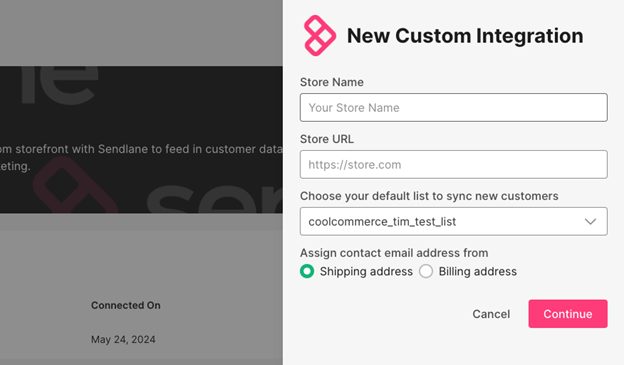
Copy your Integration Token and Save for the next step.
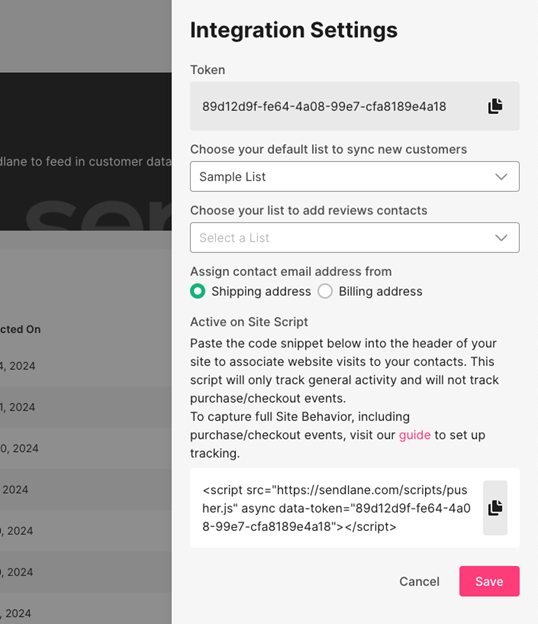
Note
You don’t need to copy the full JavaScript Snippet from this page. It is added automatically for you once you save your integration Token in Miva.
Miva Configuration
In the Miva admin, add both the API Token and Integration in Miva at Settings > Order Fulfillment. Then choose the image type you wish to use when syncing Miva Products to Sendlane.
Sendlane’s JavaScript:
To load Sendlane’s JavaScript correctly the following tag needs to be present in your Miva page head.
The tag is included by default in recent Miva releases, but you should verify it's present in your store:
<mvt:item name="head" param="modules" />Sendlane Event Tracking
On install, there are two scripts added under JavaScript Resources.

1. Beacon JavaScript – This gets output on all pages and should not be edited.
2. Sendlane Events – This file contains default automation triggers:
- product_viewed
- added_to_cart
- checkout_started
Marketing Opt-In at Checkout
The Marketing Opt-In Checkbox lets customers choose to receive marketing emails when they check out. It appears as a simple checkbox on the checkout page.
Configurable options include:
Accept Marketing Checkbox Default: Controls the visibility of the marketing opt-in checkbox (UI element).
Accept Marketing Customer Default: Determines marketing opt-in behavior for customer records created outside of standard checkout (e.g., via integrations).
Accept Marketing Order Default: Defines marketing preferences for orders created via alternate checkout methods like PayPal or Apple Pay.
Sendlane Custom Field Mapping:
The Sendlane integration supports Custom Field Mapping, allowing you to sync your Miva customer custom fields with corresponding fields in your Sendlane account. The new Custom Field Mapping tab makes it easy to map attributes like loyalty tier, company type, or region to your Sendlane contact records, enabling more personalized and targeted email campaigns.
Note: You must create the relevant Custom Fields in your Sendlane account before they will appear in the mapping drop-downs in Miva.
To use this feature:
1. Log in to your Sendlane account and create the custom fields you want to use.
2. In the Miva admin, go to Order Fulfillment and open the new Custom Field Mapping tab.
3. You’ll see a list of your Miva customer custom fields with drop-downs to map each one to a Sendlane custom field.
Adding Forms to Miva
Miva makes it incredibly simple to add custom forms to any page in Miva. A Sendlane form manager is available, which allows you to name the form and make it active or inactive.
Forms in Sendlane allows you to create custom popup or inline forms to collect customers email addressses.
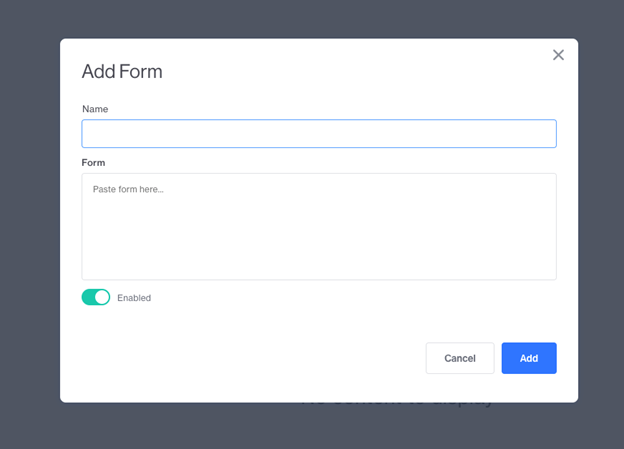
The form code is generated in Sendlane after you create your form and just needs to be copied and pasted into Miva. Once you click Add, Miva will automatically output the code required in Miva.
Data Synchronization – Miva Scheduled Task
There are two data syncs that happen in Miva and they are both controlled by the same scheduled task. When the module is installed, the scheduled task for “Sendlane Data Sync” is created.
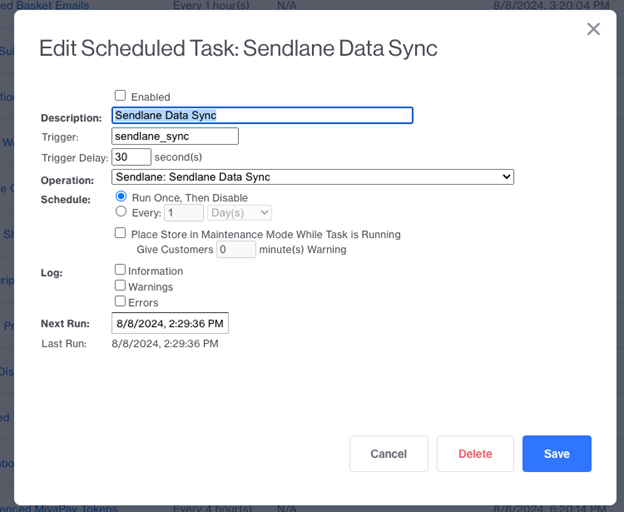
Historical Data Sync
The following data is pushed to Sendlane upon Module install:
- All Historical Orders
- All Customers
- All Products
Ongoing Data Sync
As new products, customers and, orders are added, they get added to a queue which gets processed in real time as changes happen.
Migration from Old Sendlane Module
Miva is offering free migration from the old Sendlane module. Email payments@miva.com and we can help get you migrated.