Miva supports Full Page Caching using Redis, an in-memory data store that helps storefront pages load faster.
When a page is cached, Miva stores the fully rendered HTML in Redis. Future requests for the same cached page can be served from Redis instead of rebuilding the page through templates and database queries.
Because Redis stores cached content in memory, cached pages can be delivered very quickly and may improve Time to First Byte, also known as TTFB.
For more information about Redis visit: https://redis.io/topics/introduction
Benefits of Redis Full Page Caching
Redis Full Page Caching improves performance and scalability by reducing how often Miva needs to regenerate the same page.
Key benefits include:
Faster page load times
Reduced server and database load
Higher Google Page Speed / Lighthouse Scores
- Improved SEO performance, since site speed can affect search rankings
How Redis Caching Works
A cache is a saved version of content that can be reused later. In Miva, Redis can save the fully generated HTML for a storefront page so Miva does not have to rebuild that page every time a shopper visits it.
When a shopper goes to a storefront page:
- The browser requests the page HTML from Miva.
- Miva checks Redis for a cached version of the page.
- If a cached version is found, it is called a cache hit. Miva returns the saved HTML immediately.
- If no cached version exists, it is called a cache miss. Miva generates the page normally, stores the generated HTML in Redis, and returns it to the shopper.
This process reduces server load and improves page speed.
When product, category, or page content that uses this cache behavior is updated in the Admin, Miva changes the related cache key. This tells Miva to create a fresh cached version the next time that content is requested, without requiring a full Redis cache flush.
On This Page
- Setup and Configuration
- Cache Key
- Cache Settings
- Wildcard Parameter Support
- Page Level Cache Settings
- Template Level Function
- Cache Detection for Component Modules
- X-Miva-Cache Response Header
- XML Provisioning
- Upgrading from the redis_page_cache_module
- Framework Support
- Template Branch Behavior
- Runtime JSON API Caching
- Combination Facets Support
- Before a High-Traffic Marketing Campaign
- Integration Checklist
⚠️ Write_Basket Disables Caching
If a page executes a write_basket custom field, Miva will automatically prevent that page from being cached.
This is intentional behavior to avoid storing shopper-specific data in cache.
If write_basket is used globally (for example, in the global HTML profile), it can prevent all pages from being cached.
When this occurs, you will see the following response header:
X-Miva-Cache: off aborted-write-basket
Recommended Solution
If the data being stored is not required server-side, replace write_basket usage with browser-based session storage. This allows pages to be cached while still preserving client-side functionality.
Theme Consideration
Some older Miva themes (such as Shadows and Colossus) use a global write_basket call to store the referring URL. This will prevent Redis caching from working across the site.
To resolve this, update the implementation to use session storage instead:
https://github.com/mivaecommerce/readytheme-shadows/issues/64
Setup and Configuration
Before using Redis Full Page Caching, it must be enabled at the server level.
If you are unsure whether Redis is enabled for your site, contact support@miva.com.
Connect Your Store to Redis
After Redis has been enabled, connect your store by navigating to:
Path: Store Settings → Store Details → Scroll to Cache Configuration
Select Redis from the Cache Type dropdown.
Cache Configuration
These settings define how your store connects to and uses Redis for caching.
Note: Selecting Redis as the Cache Type does not enable Redis. It must already be installed and available on your server.
Cache Type - the caching method used by your store. Select Redis to use Redis for full page caching when available.
Redis Index - the Redis database index used for caching. This allows multiple applications to share a Redis instance without overlapping data.
Redis Expiration - how long cached pages are stored before expiring (in seconds).
The default is 300 seconds (5 minutes).
Redis Connection Settings
These settings define how Miva connects to your Redis server.
1. Status - Displays the current connection status:
Connected – Redis is properly configured and available
N/A – Redis is not enabled or not configured on the server
If the status shows N/A after selecting Redis, contact Miva support to enable Redis for your server.
2. Redis Host - The hostname or IP address of the Redis server. In most cases: 127.0.0.1
3. Redis Port - The port Redis is running on. Default: 6379
4. Redis Timeout - The time (in milliseconds) Miva waits when attempting to connect before timing out.
5. Redis Password- Optional. Required only if your Redis server uses authentication.
Cache Management
Cache management tools allow you to review cache activity and clear cached content when needed.
Cache Hits - Show the number and percentage of requests served from cache.
Cache Misses - Show the number of requests that required Miva to generate a new version of the page.
Flush Cache - Clears all cached pages from Redis.
This action applies globally and cannot be performed for individual pages.
Routine product, category, template, and layout updates do not require a full cache flush. For content that uses automatic cache key updates, Miva changes the related cache key when the content is updated. The next request for that content generates a fresh cached version, while unrelated cached pages can continue to be served from Redis.
Use Flush Cache when you need to clear all cached page entries, not as the normal workflow for routine content updates.
Clear Cache from the User Interface branch action menu.
Cache Key
Each cached page is identified by a cache key — a unique string Miva generates per request to determine whether a cached version of the page can be served or whether a new version needs to be generated.
Miva builds the cache key from the following request data:
-
s.http_host(domain) -
s.request_uri(page URL, excluding query string) - Any GET or POST variables (such as URL query parameters)
- Selected cookies or headers, based on your Cache Settings
Because the cache key includes request data, different values in a request can produce different cached versions of the same page.
Content-aware cache key updates
When you update a page, product, or category in the Admin, visitors will see the updated content on their next visit. Only the updated content is affected, unrelated pages continue to be served from cache. You do not need to manually flush the cache.
Tracking parameters
Consider an email campaign link where a parameter value is unique per recipient:
https://www.domain.com/shirt.html?mc_cid=7dhs683xh
Because mc_cid is different for each visitor, each request produces a different cache key — even though the page content is identical. This prevents the page from being reused from cache and reduces caching effectiveness.
Tracking parameters like this are common with email and ad platforms. They change frequently but have no effect on page content.
Cache Settings can be configured to ignore these parameters so they do not generate unnecessary cache variations. See the Cache Settings documentation for details.
Cache Key
Each cached page is identified by a cache key. A cache key is a unique identifier Miva uses to determine whether an existing cached page can be reused or whether a new version needs to be generated.
Miva generates the cache key based on:
s.http_host(domain)s.request_uri(page URL, excluding query string)Any input GET or POST variables (such as URL parameters)
Selected cookies or headers (depending on your Cache Settings)
For supported pages, Miva may also include internal content-change information in the cache key. Product, category, template, or layout updates can automatically change the related cache key so affected content is refreshed on the next request.
This behavior is handled by Miva and does not need to be configured in Cache Settings.
Because the cache key can include request data, different values in a request can create different cached versions of the same page.
Example Use Case
Consider an email campaign link where a parameter value changes for each visitor:
https://www.domain.com/shirt.html?mc_cid=7dhs683xh
Because the mc_cid value is unique per visitor, each request generates a different cache key. This prevents the page from being reused from cache, reducing the effectiveness of caching.
This is common with tracking parameters, where values frequently change but do not affect the actual page content.
Cache Settings can be used to ignore these parameters so they do not create unnecessary variations of cached pages. See the Cache Settings documentation for more details.
Cache Settings
Cache Settings allow you to control how request data—such as URL parameters, cookies, and headers, affects cache key generation and caching behavior.
Because cache keys are built from request data, differences in parameters or other values can create multiple cached versions of the same page. Cache Settings provide the ability to control which values should be included, ignored, or used to prevent caching entirely.
Cache Settings are configured under:
Settings → Store Settings → Cache Settings
For full details and configuration examples, see: Cache Settings Documentation
Wildcard Parameter Support
Cache Settings support wildcard matching for Parameter types using a trailing asterisk (*).
Example:
utm_*
This rule matches any parameter that begins with utm_, including:
utm_sourceutm_campaignutm_mediumutm_termutm_content
Tracking parameters like these often change frequently or expand over time. Without wildcard support, each new parameter would need to be added individually to avoid creating unnecessary cache variations.
Using a wildcard allows a single rule to apply to an entire group of related parameters. This helps ensure that new or unexpected parameters do not reduce cache efficiency or create excessive cache entries.
Page Level Cache Settings
In addition to the global cache settings, these settings also exist at the page level. Any value set at the page level will override that set at the global level.
There are also page specific settings which govern how a page is cached related baskets.
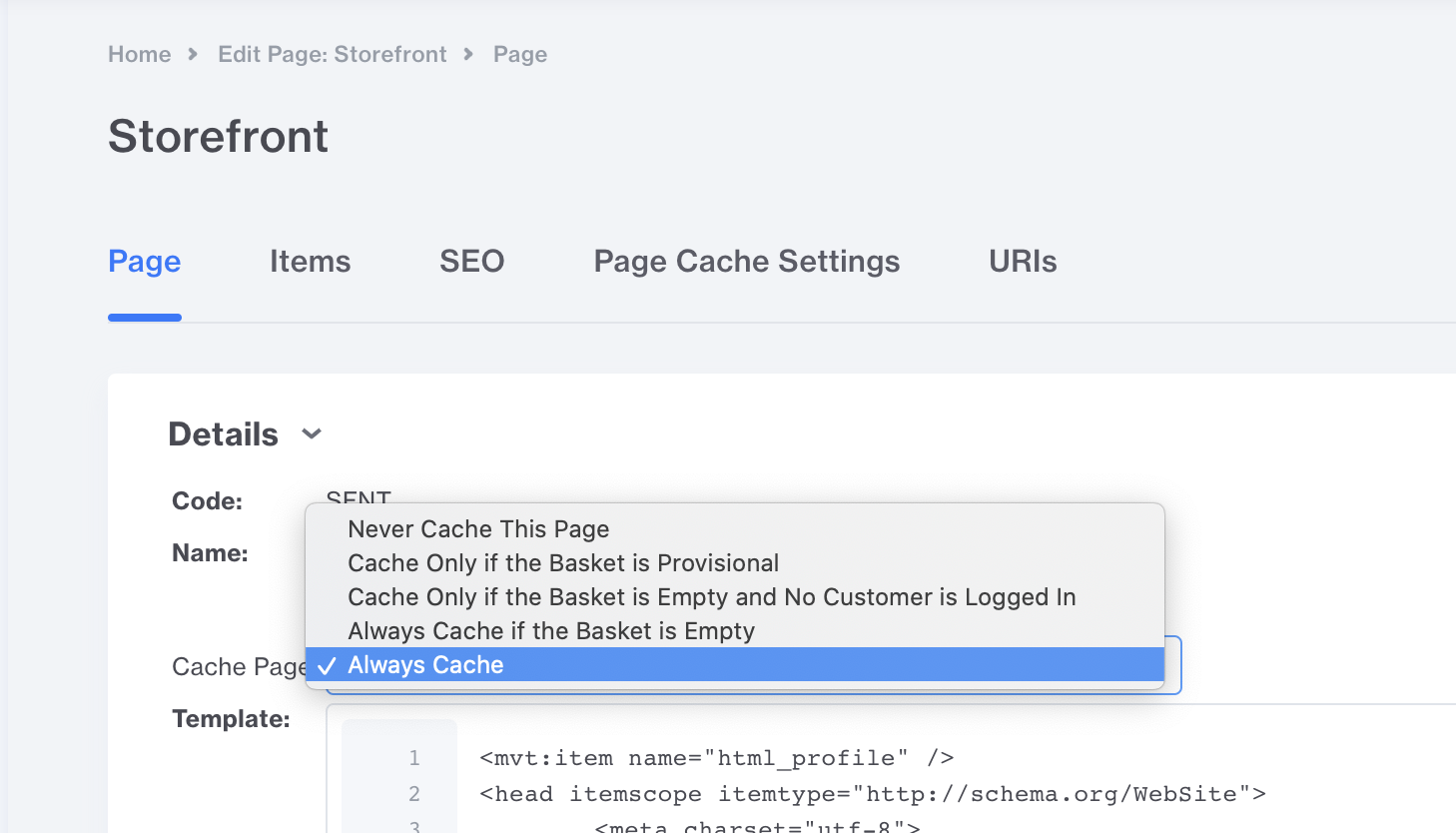
There are 5 Options:
- Never Cache This Page
- Cache Only if the Basket is Provisional
- Cache Only if the Basket is Empty and No Customer is logged In
- Always Cache if the Basket is Empty
- Always Cache
The Default of all pages is "Cache Only if the basket is empty and no customer is logged in". This makes it so that its impossible to cache customer specific basket data.
Warning
The Always Cache option should never be used on pages which contain shopper specific data such as a mini-cart, full basket or checkout. Always caching one of these pages would serve inaccurate information to each shopper. An example use case for this option would be a dedicated marketing landing page which never displayed any basket/shopper data.
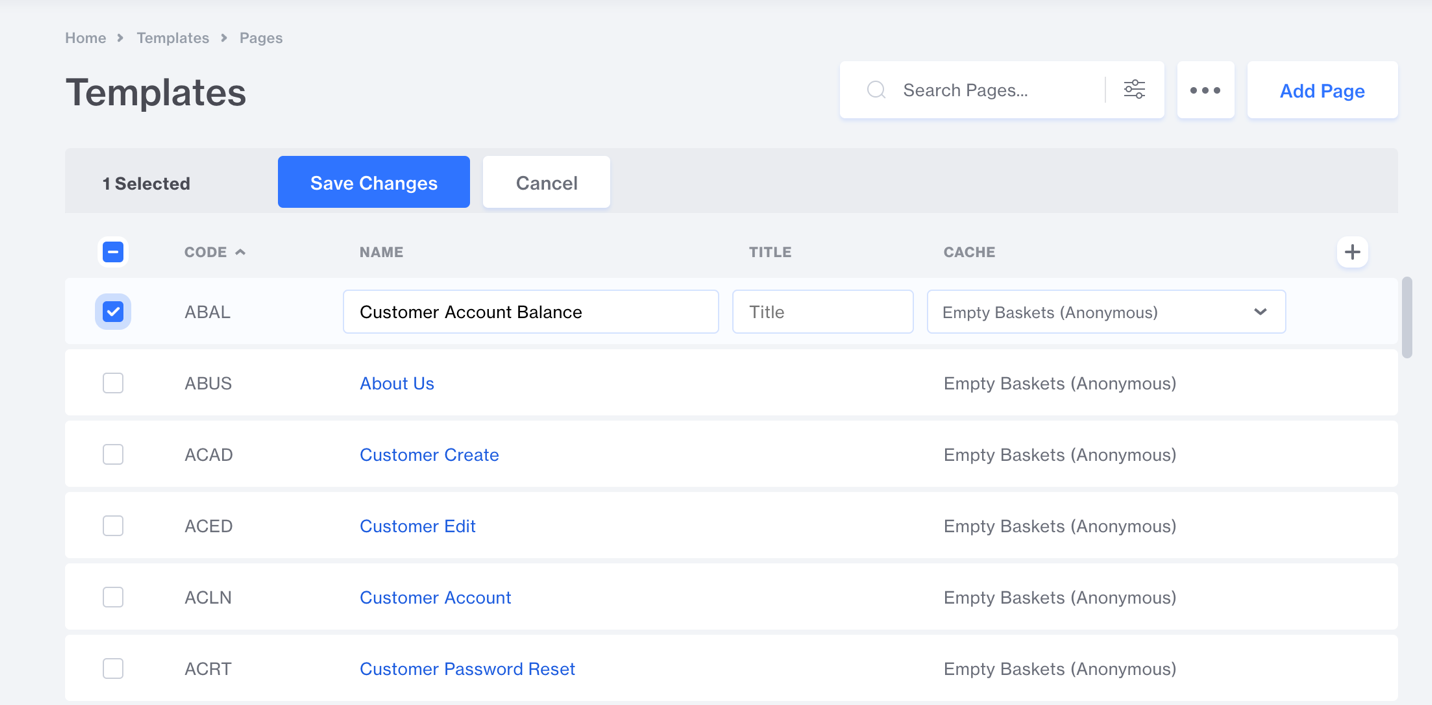
These settings can be changed individually at a per page level, or from the batch list:
Template Level Function
There exists a function you can call from any page template TemplateManager_Page_Cache_Disable( reason ), which aborts caching of a page that would otherwise have been cached.
The Write_Basket custom field function automatically calls this new function to prevent any which writes a custom basket field from being cached.
<mvt:do file="g.Module_Feature_TUI_MGR" name="l.null" value="TemplateManager_Page_Cache_Disable( 'good-reason' )" />
Cache Detection for Component Modules
There also exists a new function, TemplateManager_Page_Cached(), which returns 1 when a page is being rendered for caching. This function can be used in component modules so they can alter their behavior, if necessary, when a page is being rendered for the cache.
X-Miva-Cache Response Header
When caching is enabled, Miva outputs an X-Miva-Cache header on every page request. This header shows whether the page was served from cache and, if not, why.
When a page is served from cache or newly generated, the header includes hit or miss followed by the MD5 component of the cache key:
X-Miva-Cache: hit 581ffcd33dbcda8cd3dd48b066dc1325
When a page is not cached, the header outputs off and a reason:
X-Miva-Cache: off global-param
X-Miva-Cache: off page-header
X-Miva-Cache: off write-basket
If caching is aborted by a call to TemplateManager_Page_Cache_Disable, the reason passed to that function will appear in the header.
This header is useful for verifying caching behavior. For example, after updating a product, you can confirm that its page returns a miss on the next request while unrelated pages continue to return hit.
XML Provisioning
For bulk importing of Cache Settings, there are XML Provisioning tags both at the store level and the page level.
<Store_Update code="test"> <RedisEnabled>Yes</RedisEnabled> <RedistHost>localhost</RedisHost> <RedisPort>12345</RedisPort> <RedisPassword>abracadabra</RedisPassword> <RedisExpiration>12</RedisExpiration> <CacheSettings> <Header name="blah1" mode="key" /> <Header name="blah2" mode="disable" /> <Header name="blah3" mode="disable_substring">wombat</Header> <Header name="blah4" mode="disable_equal">cache_disabled</Header> <Parameter name="blah1" mode="key" /> </CacheSettings></Store_Update>
Upgrading from the redis_page_cache_module
Prior to Redis being built into 10.01.00, there was a stand alone module which enabled similar functionality.
As part of the 10.01.00 upgrade process any settings from the redis_page_cache_module, if installed, will get transferred into the new built in Redis Cache Settings, ensuring that the existing behavior is retained. The redis_page_cache_module will then be disabled. Both cannot be used at the same time.
All this happens automatically as part of the upgrade process.
Framework Support
The framework import/export process has also been updated to support saving and applying these new page specific cache settings. This allows developers to create their own frameworks with the Page level cache settings they prefer which will get automatically applied when the framework is applied.
Template Branch Behavior
There is logic built into the Redis Caching to prevent any template branch from ever getting Cached. This makes it so you can safely work in a template branch without having to worry about it accidentally being cached and being served to customers.
You do not need to manually add the template branch cookies to the Cache settings. This happens automatically behind the scenes.
Runtime JSON API Caching
Some Miva flex components, such as product lists, product carousels, and category lists, load data after the page HTML loads. These components use separate Runtime JSON API calls instead of relying only on the main page HTML.
Supported Runtime JSON API responses can also be cached in Redis. This creates a separate caching layer for component data.
The following Runtime functions use this JSON caching:
-
Runtime_CategoryList_Load_Query -
Runtime_ProductList_Load_Query -
Runtime_CategoryProductList_Load_Query -
Runtime_RelatedProductList_Load_Query Runtime_MerchandisingProductList_Load_Query
Because these functions are called by flex components on high-traffic pages, caching their responses reduces database load and improves response times.
Responses are cached based on request inputs before validation occurs. This means error responses may also be cached to avoid unnecessary processing.
JSON cache synchronization
Page Cache and JSON Cache are separate cache layers, but supported flex component requests are kept in sync with related product and category updates.
When a product or category is updated in the Admin, supported flex components include the updated last-modified timestamp in their next API request. Because this timestamp is part of the JSON cache key, the key changes when the product or category changes.
The next request receives a cache miss and loads fresh data, so shoppers do not see updated page content alongside stale component data, such as an older price in a product list component.
Not every JSON API request uses this behavior. It applies to supported cached Runtime JSON API requests used by flex components.
Runtime JSON Cache Key Format
The JSON cache key follows this format: json_<function_name>:<cache_key>
Where function_name is the lowercase name of the function being called.
The cache key includes:
- Offset, Count, Sort, and Filter values from the request
- For
Runtime_CategoryProductList_Load_Query: Category ID or Category Code - For
Runtime_RelatedProductList_Load_Query: Product ID or Product Code - For
Runtime_CategoryList_Load_Query: Parent ID
Global store-level Cache Settings are also honored.
When provided by supported flex components, the cache_keys filter is also included in the JSON cache key. This filter contains last-modified values for the related product or category. When that product or category is updated, the value changes and Miva generates fresh JSON data on the next request.
Merchants do not configure cache_keys in Cache Settings. This behavior is handled automatically by supported flex components.
Hit/Miss Counters
JSON cache hits and misses are tracked separately from page cache and are displayed under json_cache_status:<store_id>.
Combination Facets Support
The combination facets uses cookies to store the value of the Year, Make Model selected. This makes it so that a single URL may display completely different products based on what was selected. This module has been updated to automatically register any cookies used in the Store Level Cache Settings. This allows pages which use combination facets to still get cached and deliver the correct content.
Before a High-Traffic Marketing Campaign
Before launching a major campaign, review your Redis caching setup. Campaign URLs often include tracking parameters that can reduce cache effectiveness if they are not configured correctly.
Integration Checklist
Below is a list of things to check when implementing Redis Caching. Server-sided logic that shows/hides content to users based on the any of the following criteria should be looked at prior to caching being enabled.
Write_Basket Custom Field
Ensure write_basket is not used on pages intended to be cached. Global usage (such as in the HTML profile) will prevent caching across the site.
See Write_Basket Disables Caching above for details and recommended solutions.
- Client Dimensions - If your site uses Client Dimensions, the cookies should be added to the Cache Settings
- Cookies - Common uses cases include: GDRP Cookie Agreement, Recently Viewed Products, Continue Shopping URLs
- User Agent - Common uses cases include: Checking for mobile, tablet, or desktop devices and showing them different content, Showing/hiding things for Googlebot or other search engines.
- IP Address - Common uses cases include: Showing/hiding features based on client IP Address, Testing development features based on IP address, s.remote_addr
- Custom Headers - Common uses cases include: Template Code referencing system variables beginning with s.http_xxxx such as s.http_access_token, s.http_accept, s.http_host, miva_output_header
- OAuth Module - If using the OAuth module to allow for login with facebook,google,amazon,twitter the following pages should be excluded from the cache: google-redirect,amazon-redirect,facebook-redirect,oauth
-
Including Session IDs in Links - You want to verify the template code is not using any session specific variables so sessions don't get cached in links. Examples include:
- session_id
- sessionurl
- secure_sessionurl
- sessionurl_nosep
- secure_sessionurl_nosep
- customer_session_id
- checkout_session_id
-
Setting Cookies - Examples include:
- request_cookies
- SetCookie
- OutputCookies